
Need for Speed™ No Limits
ELECTRONIC ARTSRacing
4.4118.25K Reviews
- Version
- 9.6.0
- Installs
- 100.00M
- Age Rating
- Everyone 10+
Screenshots
Our Review of Need for Speed™ No Limits
 Analysis by Appyee
My preferred way to approach Need for Speed™ No Limits is to treat each short race as one step in a longer garage plan, not as a reason to chase every event at once. That makes the game easier to enjoy in brief sessions and helps me decide where to spend my time. It is a free racing game from ELECTRONIC ARTS, rated 4.4 on average from around 5.2 million ratings, with over 100 million installs. Those numbers point to a familiar, well-established mobile racer, but the day-to-day experience still depends on whether you like short bursts of street racing and gradual car progression.
A practical loop for short sessions
I’d start with the campaign and use it to learn the steering and drifting before worrying about competitive goals. The races are brief enough to fit between other tasks, and repeating them can give a session a clear purpose: work toward an upgrade, try to improve a run, or make progress through the story. A realistic routine might be a few races while waiting for a ride or during a break, then a longer session when you want to compare cars and decide what to upgrade next. I wouldn’t open the game expecting a long, uninterrupted simulation-style race; its appeal is the quick hit of speed.
One useful habit is to pick a priority before entering a race. If I’m aiming to move through the campaign, I focus on the car I’m using there rather than spreading attention across every vehicle. If I’m just playing casually, I use the session to practise a section of the driving loop or enjoy customization without treating every result as a test. That small distinction helps the progression feel more deliberate and makes it easier to stop when I’ve had enough, instead of chasing one more race without a plan.
First Impressions
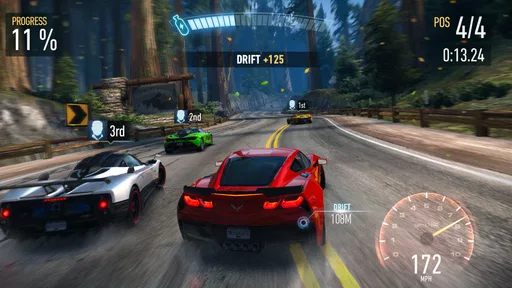
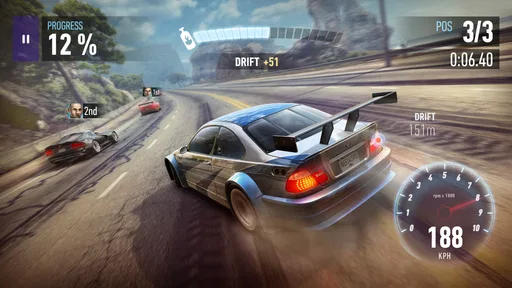
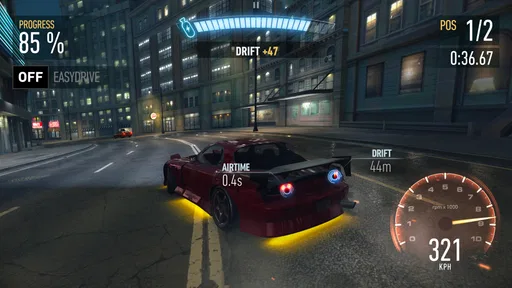
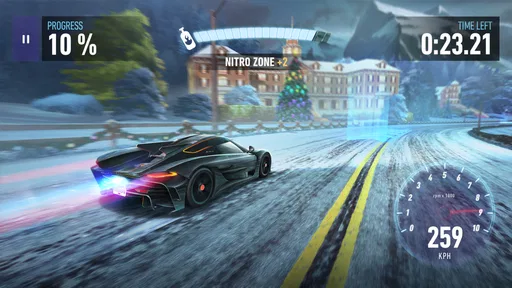
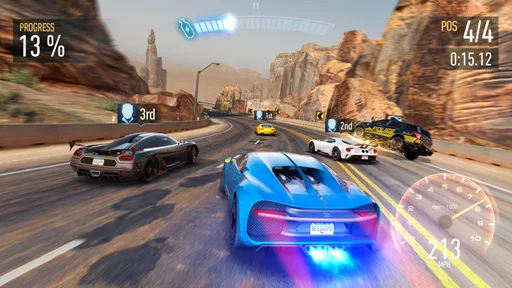
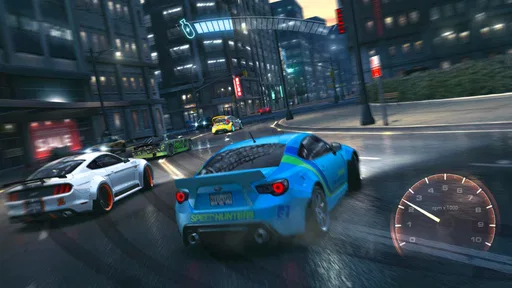
When I first opened Need for Speed™ No Limits, I was greeted by sleek graphics and a heart-thumping soundtrack that instantly set the mood for high-speed street racing. The visuals are top-notch, with meticulously detailed cars and immersive cityscapes that make you feel like you're part of a Fast & Furious movie. And the best part? You can experience all this right from the palm of your hand!
The Gameplay
Now, onto the gameplay. It’s as intense as you’d expect from a Need for Speed title. The controls are intuitive, and I appreciated how easy it was to pick up and play. You’ve got your standard tilt-to-steer and tap-to-drift mechanics, which are smooth and responsive. The game does a great job of balancing challenge with accessibility, making it perfect for newbies and seasoned racers alike.
The races are short but exhilarating, and there’s a satisfying sense of progression as you upgrade and customize your rides. Speaking of which, the customization options are extensive. From paint jobs to performance parts, there’s plenty to tinker with. You can really make each car your own, which adds a nice personal touch to the game.
Settings that can make a difference
I recommend spending a moment with the steering options before deciding that the controls suit you. Tilt steering feels natural if you like moving the phone, while touch-based input can be more comfortable if you’re playing on a crowded train, lying on the sofa, or trying not to wave your device around in public. There is no universally best choice: the useful test is to run the same kind of race with each option and notice which one lets you make small corrections without oversteering.
Drifting deserves a little practice too. It can look like a flashy move, but in this game it is also part of how you handle corners and keep a run flowing. I’d practise entering a turn smoothly rather than tapping frantically at the last moment. If a race keeps going wrong at the same bend, pay attention to whether you are starting the drift too late or steering too sharply; changing one habit at a time is more helpful than blaming the car or buying an upgrade immediately.
Build a repeatable upgrade routine
The garage invites experimentation, but I find it more useful to make upgrades with a specific purpose. Before spending resources, ask whether the car is holding you back in the races you actually want to play, or whether you simply feel tempted by a new part. When progress slows, replaying accessible races and improving your driving can be a sensible alternative to spending money just to force the next step. It may take patience, but it keeps the free-to-play option viable and makes each improvement feel earned.
Customization and performance are different kinds of satisfaction. Changing a paint job is a personal choice; improving a car is a practical one. I’d avoid treating every attractive option as essential, especially if you are still learning which cars you enjoy driving. Trying to build a garage full of favourites at once can divide your attention. Choosing one main car for current progress, then branching out when you have a reason, is a calmer way to manage the game’s upgrade loop.
Game Modes and Features
Need for Speed™ No Limits offers a variety of game modes to keep things fresh. The campaign mode is engaging, with a series of races that tell a story of underground racing culture. There are also special events and daily challenges that provide plenty of reasons to keep coming back.
One of the standout features is the “Blackridge Rivals” mode, where you can test your skills against other players. It’s a competitive online experience that adds a layer of unpredictability and excitement. The thrill of climbing the leaderboard is real, and it’s a great way to show off your custom rides.
Choosing the right kind of competition
I’d treat the campaign, recurring challenges, and Rivals as different reasons to play rather than a checklist you must clear every time you open the app. The campaign gives a steady sense of direction, while daily challenges can make a quick visit feel worthwhile. Rivals is better when you want the added pressure of comparing your driving with other players. If competitive rankings frustrate you, there is no need to make them the measure of whether you are enjoying the game; the shorter solo races and car-building loop can still be the main attraction.
That distinction also helps with time management. On a busy day, I’d choose one quick objective and leave the rest for later. On a relaxed evening, I might spend longer tuning my approach to a race or trying Rivals for a change of pace. The game has several hooks, but using them selectively is more enjoyable than turning every visit into a task list.
Where this racer fits among alternatives
Compared with a more simulation-focused racing game, this one puts quick action, drifting, and vehicle progression ahead of long races and detailed driving setups. That makes it a better fit for someone who wants a few energetic runs on a phone than for a player seeking realistic handling or a careful recreation of track racing. Compared with arcade racers built mainly around immediate, uncomplicated races, its campaign and upgrades give you more to work toward between sessions, though that progression can also make the experience feel slower when you are waiting for a particular car or improvement.
For me, the deciding question is whether you enjoy the loop of racing, earning progress, and returning to the garage. If you do, the structure gives short sessions a purpose. If you mainly want a game that lets you choose any car and race freely without much progression pressure, a more pick-up-and-race alternative may suit you better. Need for Speed’s street-racing style is the draw, but the upgrade journey is a substantial part of the commitment.
Monetization and In-App Purchases
Now, let's talk about the elephant in the room: in-app purchases. Like many free-to-play games, Need for Speed™ No Limits has its fair share of monetization strategies. You can buy in-game currency to speed up progress, but I found that you can still enjoy the game without spending a dime. Patience is key here, and if you're willing to grind a bit, you can still have a blast without opening your wallet.
The game is free to download, but its optional purchases range from $0.99 to $99.99 per item, so I’d recommend deciding on a spending limit before you start. Paying may be tempting when you want to accelerate progress, yet it does not replace learning the turns or choosing upgrades carefully. If you prefer a game with no purchase prompts or progression tied to a free-to-play economy, this is a real drawback to consider. I’d also be cautious about spending simply because one event feels difficult: first check whether a different driving approach or a more focused upgrade plan helps.
The key is to enjoy the journey as much as the destination.
Limits, comfort, and who should skip it
The short-race format is convenient, but it can also make the experience feel repetitive if you prefer long events with changing tactics. The campaign, challenges, and Rivals add variety, yet the central pleasure remains racing, drifting, and improving cars. Someone who dislikes repeating races to build progress may find the loop more like a chore than a hobby. I’d also steer players who want a grounded driving simulator toward a different kind of racer: the appeal here is arcade-style momentum, not a demanding lesson in real-world car control.
It carries an Everyone 10+ age rating, which is useful context for families deciding whether it is appropriate. I’d still look at the purchase options together if a younger player will use it, since optional spending can become part of the experience. For device compatibility, the game requires Android 6.0 or later; it is currently at version 9.0.0. Those details make it easier to check whether an Android device can run it before setting aside time to install and explore.
One practical limitation of mobile racing is that your surroundings affect how comfortably you can play. Tilt steering may be awkward in a packed commute, and quick races can still demand more attention than you want to give while waiting in a busy place. I save competitive play for when I can focus, and use casual sessions when I’m somewhere I can hold the phone steadily. That simple choice makes the controls feel less frustrating and keeps a small game session from becoming an inconvenient one.
The Final Verdict
All in all, Need for Speed™ No Limits delivers a thrilling racing experience that's well worth a download. It captures the essence of the franchise with its high-octane races, rich customization options, and engaging gameplay. Sure, the in-app purchases can be a bit much at times, but the core experience is strong enough to stand on its own.
If you’re into racing games or just looking for something to get your pulse racing, give this app a spin. Just remember to hold onto your hat, because this ride is fast, furious, and oh-so-fun!
My mastery verdict
I’d recommend it to a friend who wants an energetic mobile racer that rewards a steady routine: learn the controls, focus upgrades on the car you’re using, and choose events according to the time and mood you have. The strongest habit is also the simplest: when a race goes badly, change one thing on the next attempt—your line through a turn, your drift timing, or your upgrade priority—instead of changing everything at once. That makes improvement easier to notice and helps keep spending optional rather than automatic.
With a 4.4 average and around 118,000 written reviews, it has clearly found a large audience, but its fit is personal. I’d skip it if I wanted realistic circuit racing, long uninterrupted events, or a progression-free experience. For quick street races, visible car development, and a choice between solo goals and player competition, it remains an appealing free game from ELECTRONIC ARTS. Give it a try if that balance sounds good to you, and keep the pace on your terms.
Privacy and Permissions
See what permissions an app requests and how it handles your data.
- Photos/Media/Files
- read the contents of your USB storage, modify or delete the contents of your USB storage
- Storage
- read the contents of your USB storage, modify or delete the contents of your USB storage
- Wi-Fi connection information
- view Wi-Fi connections
- Other
- view network connections, full network access, run at startup, use accounts on the device, control vibration, prevent device from sleeping, Google Play license check
Verdict
Strengths of Need for Speed™ No Limits
- Stunning graphics enhance gameplay experience.
- Wide variety of customizable cars.
- Engaging storylines keep players hooked.
- Frequent updates with new content.
- Smooth controls for an immersive feel.
Limitations of Need for Speed™ No Limits
- Requires a stable internet connection.
- In-app purchases can be pricey.
- Energy system limits play time.
- High storage requirement on devices.
- Long loading times occasionally.
Other Releases by ELECTRONIC ARTS
View All
Plants vs. Zombies™
Strategy3.7

EA SPORTS FC Soccer Mobile 26
Sports4.6

EA SPORTS™ NBA LIVE Mobile
Sports4.1

SimCity BuildIt
Simulation4.1
Similar Picks in This Category
View All
Hill Climb Racing
Fingersoft4.3

Dr. Driving
SUD Inc.4.2

Traffic Rider
skgames4.5

Asphalt 8 - Car Racing Game
Gameloft SE4.6

Race Master 3D: Car Racing
Beresnev Games4.6

Extreme Car Driving Simulator
AxesInMotion Racing4.3
Frequently Asked Questions
What are the minimum device requirements to run Need for Speed™ No Limits?
Need for Speed™ No Limits requires a device running Android 4.1 or later, or iOS 9.0 or later. For optimal performance, a device with at least 1GB of RAM is recommended. Ensure you have sufficient storage space, as the game frequently updates, which can increase the storage requirements.
Is an internet connection necessary to play Need for Speed™ No Limits?
Yes, an internet connection is required to play Need for Speed™ No Limits. The game relies on online features such as multiplayer races, daily challenges, and updates. A stable connection enhances the gaming experience by ensuring smooth gameplay and access to the latest content.
Are there in-app purchases in Need for Speed™ No Limits?
Yes, Need for Speed™ No Limits offers in-app purchases. Players can buy various items such as car parts, currency packs, and customization options. While the game is free to download, these purchases can enhance the gaming experience by speeding up progression and unlocking exclusive content.
How can I customize my cars in Need for Speed™ No Limits?
In Need for Speed™ No Limits, you can customize your cars with a wide range of options. Players can modify the performance with upgrades to the engine, suspension, and more. Visual customization includes paint jobs, decals, and body kits, allowing for a personalized racing experience.
Does Need for Speed™ No Limits support offline play?
No, Need for Speed™ No Limits does not support offline play. The game is designed to be played online to enable features like real-time multiplayer races and regular content updates. Playing offline is not possible, so a consistent internet connection is necessary to enjoy all aspects of the game.
Play our best games!


